
.svg)
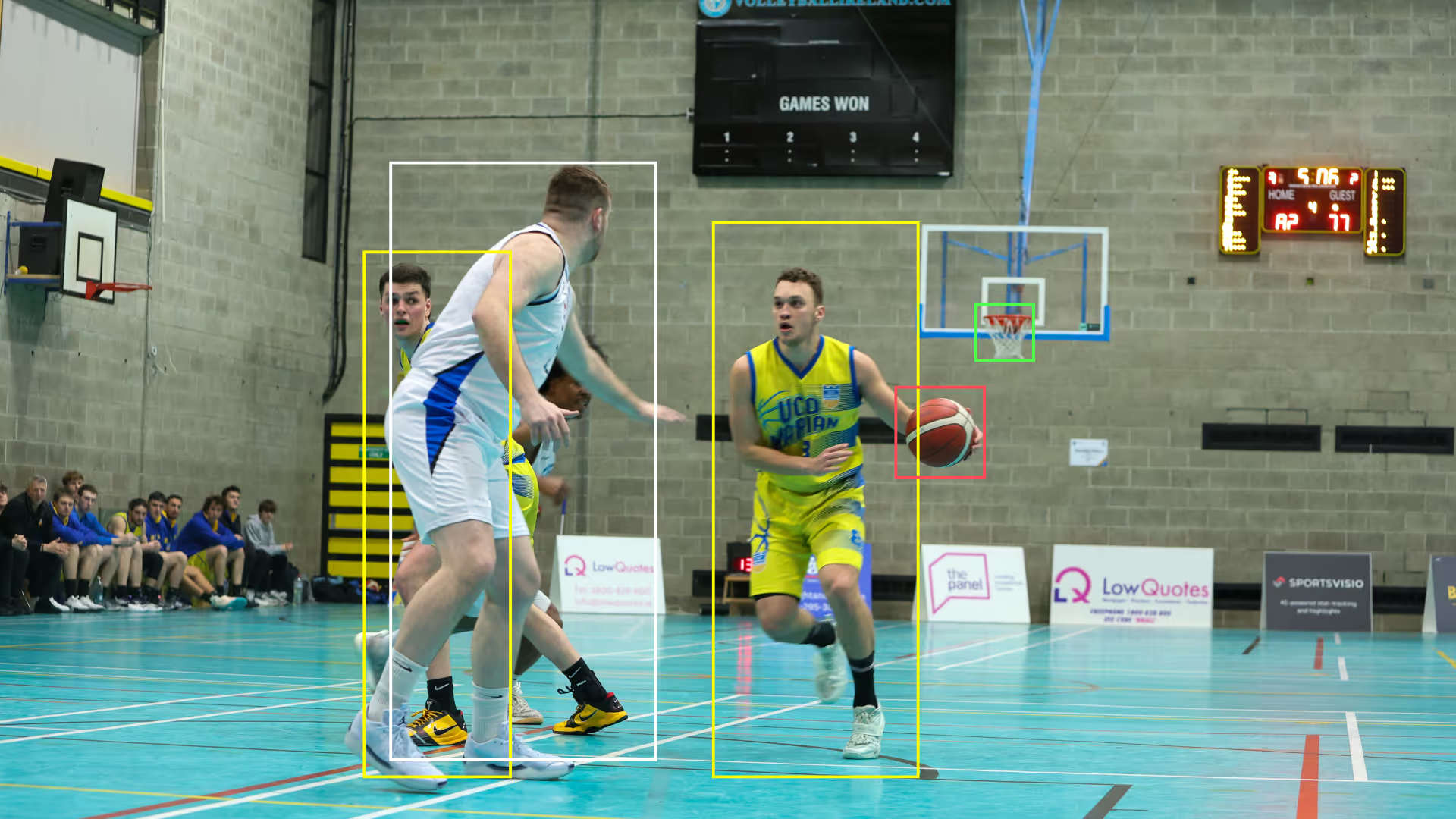
Basketball AI that turns game film into a full box score
Most youth and club teams already record games on a phone or fixed camera — then spend nights tagging film, waiting on a scorekeeper, or guessing which possessions mattered. Basketball AI closes that gap: one continuous full-court upload becomes a box score, per-player highlights, and coach-ready analytics without manual tagging or wearables. That is the commercial answer SportsVisio was built to deliver.
What is basketball AI? Basketball AI uses computer vision to watch recorded game film the way a scorekeeper would: it tracks players and the ball, detects shots, rebounds, assists, turnovers and fouls, and builds a full box score with matching video clips — without manual tagging or wearables. SportsVisio's basketball AI works from phone or fixed-camera footage of a full court; on consumer-recorded games it reports 95%+ event detection and 92%+ player attribution when jersey numbers are visible and the recording is continuous. Results are delivered in the app as team and player stats, per-player highlight reels, and (in Coach Mode) shot charts and advanced metrics.
If you want the product path for staff who live in film and practice plans, start with SportsVisio for coaches. For a deeper look at the pipeline itself, see how AI basketball analysis works.
What you get from one upload
Upload a continuous recording of a full-court game and SportsVisio's basketball AI returns a complete package — not a single clip or a partial scoring sheet. The same game file drives team and individual box scores, shareable highlight reels for every player, and (in Coach Mode) shot charts, zone efficiency, and advanced metrics that used to require a dedicated video staff.
- Full box score — points, field goals, three-pointers, free throws, rebounds, assists, steals, blocks, turnovers, and fouls, tied back to the moments that produced them.
- Per-player highlight reels — automatic mixtapes so athletes, parents, and recruiters can see the plays behind the numbers without scrubbing an hour of film.
- Stat-linked clips — every counted event can be opened as video, which makes film review faster than a traditional tagged timeline.
- Coach analytics — shot charts, zone shooting efficiency, offensive and defensive ratings, eFG%, TS%, rebound rates, plus/minus, and plain-language game summaries.
- League-ready outputs — standings and leaderboards that update as games process, so operators do not rebuild sheets by hand after every tip-off.
Turnaround is typically within 24 hours; confirm current timing with the product for your volume and footage type. The commercial pitch is simple: stop paying people to watch film for basic counting, and spend that time on teaching.
"SportsVisio is a secret weapon. Quick access to stats and highlights is like having a coach and a video assistant in my pocket."
— Duncan Robinson, Detroit Pistons
How basketball AI works
SportsVisio's basketball AI is a pipeline, not a magic button. Understanding each stage helps you capture better film and set the right expectations with coaches, parents, and league directors. A longer walkthrough lives in our guide on how AI basketball analysis works.
Capture
Record the full court continuously from a phone, tablet, or fixed camera. Frame both baskets and the painted areas so players and the ball stay in view for the length of the game. You do not need sensors, wearables, or a broadcast truck — consumer footage is the intended input. If you already use an automated camera stack such as Spiideo, that capture layer can feed the same stats workflow; see how SportsVisio plus Spiideo fits together for clubs that want hands-off recording plus AI box scores.
Upload
In the app, enter game details, select the file, and upload. No play-by-play tagging, no jersey-by-jersey scrubbing, and no requirement that a scorekeeper sit courtside with a laptop. One continuous file is enough; the AI does the watching.
Detect
Computer vision tracks players and the ball across the court, reads jersey numbers when they are visible, and detects the events that make up a box score: shots (makes and misses), rebounds, assists, turnovers, steals, blocks, and fouls. Published product claims for consumer-recorded games are 95%+ event detection and 92%+ player attribution when numbers are readable and the recording is continuous. Those figures are product claims for the conditions above — not a guarantee for every clip shot in a dark gym corner.
Deliver
When processing finishes, the app surfaces team and player stats, per-player highlight reels, and Coach Mode views such as shot charts and advanced metrics. You get notified when the game is ready — typically within 24 hours (confirm with product). From there you share highlights, build film sessions, or feed league leaderboards without rebuilding anything by hand.
Accuracy and footage rules
Basketball AI is only as strong as the film you give it. SportsVisio publishes high accuracy on consumer footage when jersey numbers are visible and the recording is continuous: 95%+ event detection and 92%+ player attribution. Treat those as published product claims, and treat capture quality as the lever you control on game day.
What the camera must see
- Full court in frame — both baskets and the key areas where most scoring and rebound events happen.
- Continuous recording — avoid stop-start clips that break possession context; one file per game (or half) works best.
- Readable jersey numbers — attribution depends on seeing who took the shot or grabbed the board.
- Stable viewpoint — a fixed camera or steady tripod angle beats constant zooming and panning.
- Enough light — the ball and numbers need to resolve; extreme underexposure is a common accuracy hit.
What breaks stats
- Half-court or single-basket framing that hides the weak-side rebound or the outlet assist.
- Heavy zoom that loses half the floor every possession.
- Obstructed numbers (pinnies over jerseys, low-contrast kits, long stretches with backs to the camera).
- Choppy, multi-clip uploads that erase continuity between possessions.
- Very low light or heavy motion blur that makes the ball and digits unreadable.
Follow those rules and basketball AI behaves like a tireless scorekeeper with a video department attached. Break them and you will still get output — with more missing or mis-attributed events. For how the numbers themselves are defined, see basketball stats explained.
Who it is for
SportsVisio's basketball AI is built for programs that already film games and want NBA-style outputs without hiring a tagging staff. The same upload serves coaches, league operators, players, and parents. Explore the basketball sport page for the full feature set.
Coaches
Coaches need evidence before the next practice, not a weekend of scrubbing. Coach Mode turns one upload into box scores, filterable shot charts, zone efficiency, advanced metrics, and AI game summaries that call out positives and areas for improvement. Film review becomes selective: open the clip behind a missed corner three instead of watching every possession. Start on the coaches page when you want the analytics suite rather than highlights alone.
Leagues
League operators need consistent stats across venues without staffing every gym with scorekeepers. Basketball AI standardizes box scores from the footage clubs already capture, updates leaderboards as games process, and gives member teams highlights they can share — a commercial differentiator for youth and club leagues competing for teams and parents.
Players & parents
Players want proof of progress and clips worth sending to coaches or recruiters. Parents want to see the game without guessing which possessions mattered. Per-player reels and season stats make both jobs easier. No wearables, no special device — the same phone video that was going to sit in a camera roll.
Basketball AI vs tools people confuse it with
Buyers often compare SportsVisio to tagging platforms, drill apps, capture cameras, and other AI stats products. Those tools solve adjacent jobs; basketball AI for full-game box scores and highlights is a different outcome. For market context, see the best basketball analytics software, best Hudl alternatives for youth basketball in 2026, and a direct SportsVisio vs Hudl comparison for youth teams.
- Hudl tagging — powerful film libraries and manual or assisted tagging workflows. SportsVisio focuses on automatic event detection from full-court film so you are not building the box score by hand after the game.
- HomeCourt drills — excellent for individual skill work and shooting sessions. It is not a full-game box-score engine for 5v5 or 3x3 competition film.
- Veo, Trace, and Spiideo capture — automated or assisted cameras that solve recording and sometimes tracking. Capture and stats can stack: Spiideo (and similar) can supply the film while SportsVisio delivers the box score and highlights — detailed in the SportsVisio + Spiideo stack.
- Preciser, Hooper, and League Lens — each targets parts of the AI-stats or highlights space. SportsVisio's commercial angle is full-court film to team/player box scores, per-player reels, and coach analytics without scorekeeper tagging or wearables, with published accuracy claims under the footage rules above.
Choose by outcome: if you need drill feedback, use a drill app; if you need a camera operator replaced, evaluate capture hardware; if you need a scorekeeper and video assistant from the film you already shoot, that is basketball AI.
What stats are tracked
SportsVisio's basketball AI produces the counting stats coaches and leagues expect, then layers coach analytics on top. Exact metric availability can depend on product mode (standard vs Coach Mode).
- Points, field goals made/missed, three-pointers, free throws
- Rebounds (and related rebound-rate views in coach analytics)
- Assists, steals, blocks, turnovers, personal fouls
- Team and player box scores, with season and career views as games accumulate
- In Coach Mode: shot charts (team and player, filterable by half, makes, and misses), zone shooting efficiency, offensive/defensive ratings, eFG%, TS%, plus/minus, and AI game summaries
Every counted event is meant to connect back to video so the number is auditable. For definitions, use basketball stats explained. Pricing is listed on the site — we do not invent package numbers here; see current plans on the pricing page.
Get a free trial
The fastest way to evaluate basketball AI is to run it on your own film. Record a full-court game the way you already do, upload it, and review the box score, per-player highlights, and coach views against what you saw in the gym. Results are typically ready within 24 hours — confirm timing with the product when you start.
- Capture continuous full-court footage with visible jersey numbers.
- Upload through the app with your game details.
- Review stats, highlights, and Coach Mode analytics when processing completes.
- Share reels with players and parents, or take charts into the next practice plan.
Start a free trial, compare plans on pricing, or book a demo if you want a walkthrough for your club or league. Basketball AI will not replace coaching judgment — it removes the manual scorekeeping and tagging bottleneck so that judgment has better evidence, sooner.
Related Stories
.webp)
Book a Demo and Get a Free Trial
Set up time to speak with our team and see our product in action.