
.svg)

Best Basketball Analytics Software for 2026: What to Look For
Coaches don’t need more data. They need more time.
Most basketball software still assumes the same workflow: watch the full game, tag clips by hand, track stats separately, then build feedback for players. The interface looks modern. The burden stays on the coach.
The tools worth paying for now flip that order. The system does the tedious work first, and you spend your time coaching — reviewing patterns, teaching, building the next practice plan.
Where this is heading
The first generation of basketball software digitised the box score. Points, rebounds, assists — the same numbers a parent with a clipboard could produce, just faster and in an app.
The generation being built now is different in kind. It reads the game in possessions, not totals. It knows the difference between a bucket in transition and a bucket against a set defence. And it doesn’t stop at telling you what happened — it tells you what to do at practice on Tuesday.
That’s the standard to buy against. Not how many stats a platform lists, but whether it understands context and turns that into a decision.
Three approaches, and how to tell them apart
Manual video platforms. Built around tagging. You import film, create labels, clip plays, organise playlists. Powerful, but it depends on you or your staff doing the work consistently, every week, all season.
Service-based breakdown. You send video out and get stats and edits back. Saves coaching time, but it costs more, turnaround varies, and it’s hard to scale across multiple teams or a league.
AI-powered platforms. These start with automation. They take video you already capture and produce usable outputs without anyone tagging every possession.
One question separates them: after a game, do I spend less time on admin than I did last season?
If the answer is no, it isn’t an assistant coach. It’s a different interface for the same workload.
What to look for
- AI insights and actions. Is the AI assistant coach prepped to take work off your hands — build a scout for you, or name the focus area for your next practice or training session? Insight you still have to interpret and convert is only half the job.
- Automated stat tracking. Manual recording is slow and error-prone. The better platforms use AI and computer vision to log points, rebounds, assists, steals and the rest from video.
- Stats tied to video. Numbers alone aren’t coaching. You need to click from what happened to show me the plays.
- Advanced metrics that mean something. Efficiency and possession context, not a longer box score. If you want the vocabulary first, start with Basketball Stats Explained.
- Access without extra work. Assistants and players should be able to find their own moments. The coach shouldn’t be the only person who can.
- Cost that matches how much you play. Per-game and per-season models suit very different programs.
For a side-by-side feature and pricing comparison across the main platforms, see our complete video analysis software comparison.
The analytics that actually change decisions
Most platforms will sell you volume. What changes a game plan is a small number of measures that explain why the scoreboard looks the way it does.
The four factors
Dean Oliver’s framework — the four factors of basketball success — holds up because it compresses a game into the only four things that decide it: shooting efficiency, turnovers, rebounding, and getting to the free-throw line. Ranked in that order. A team that loses by twelve has usually lost one of those four badly, and knowing which one tells you what Tuesday’s practice is.
Points in the paint
Separates a team scoring at the rim from a team living on jumpers. Two identical point totals can describe completely different offences, and completely different defensive problems for your next opponent.
Points off the break
Tells you whether your transition game is real or anecdotal, and whether your defence is giving up easy ones after misses. It is also the clearest example of a stat that means nothing without the clips attached — you need to see the six possessions, not the number six.
Possession-level context
Per-possession efficiency is how you compare a team that plays at 80 possessions to one that plays at 60. Totals flatter fast teams and punish slow ones. Efficiency doesn’t.
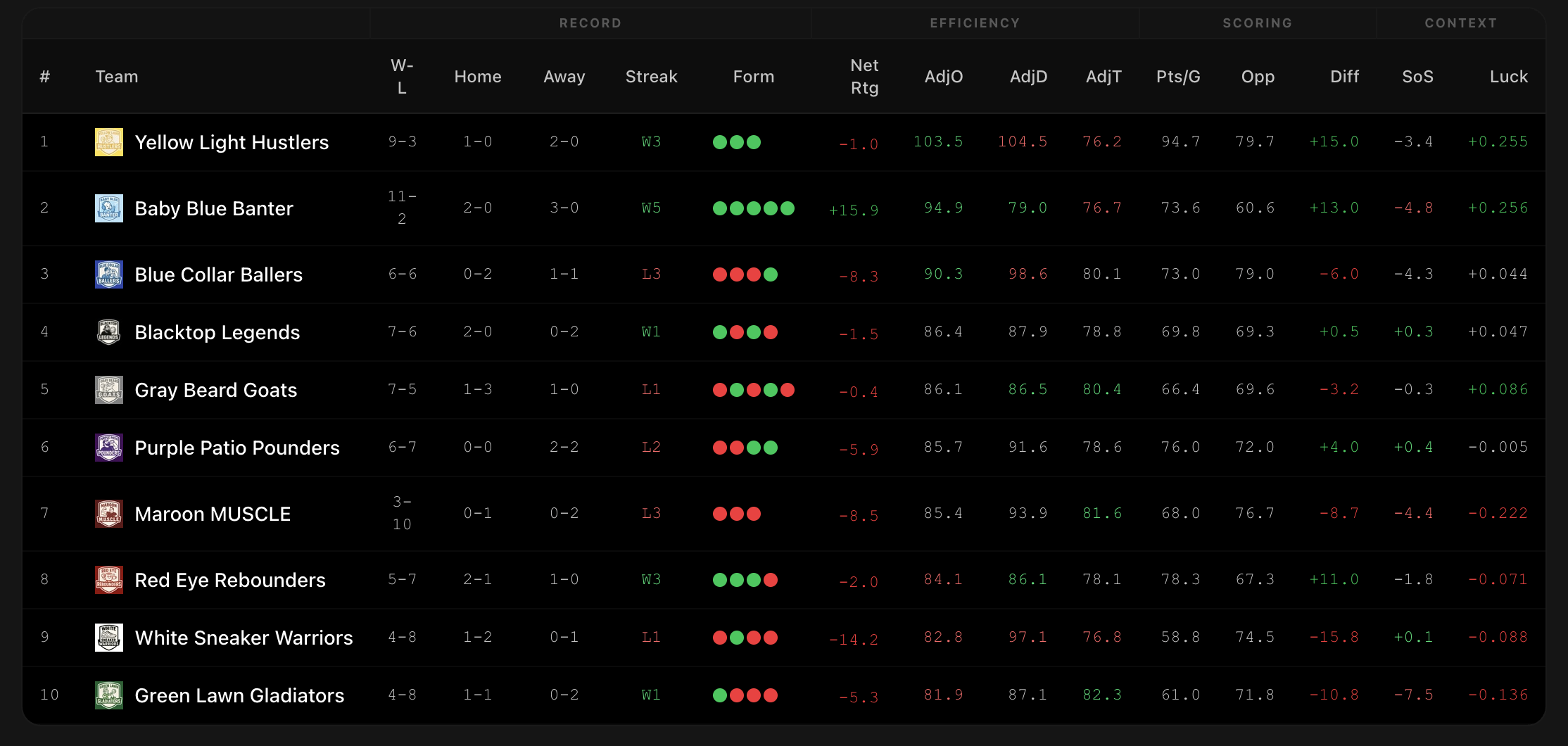
SportsVisio delivers all four of these today — the four factors, points in the paint, points off the break and per-possession efficiency — alongside the full box score, PIE and PSO. Every one of them is tied to the film, so the number and the possessions that produced it sit together instead of in separate tabs.
What you actually get after a game
Upload the game and you get film back as structure rather than a blank timeline, within 24 hours:
- Film broken down for you. Possessions labelled, actions detected, plays searchable. Pull up every turnover or every made three without scrubbing footage.
- Custom playlists. Build and share your own reels — every point off the break, every defensive rebound, whatever your next practice theme is.
- A complete box score. Team and player stats, shooting percentages, advanced metrics, no volunteer stat-keeper required.
- Clickable shot charts and heat maps. Where your team scores and where it stalls, in a form you can take straight into practice.
- A highlight reel for every player. They watch their best plays and their mistakes without you editing anything.
- Scouting on your opponents. Tendencies and preferred looks, faster than watching their season back.
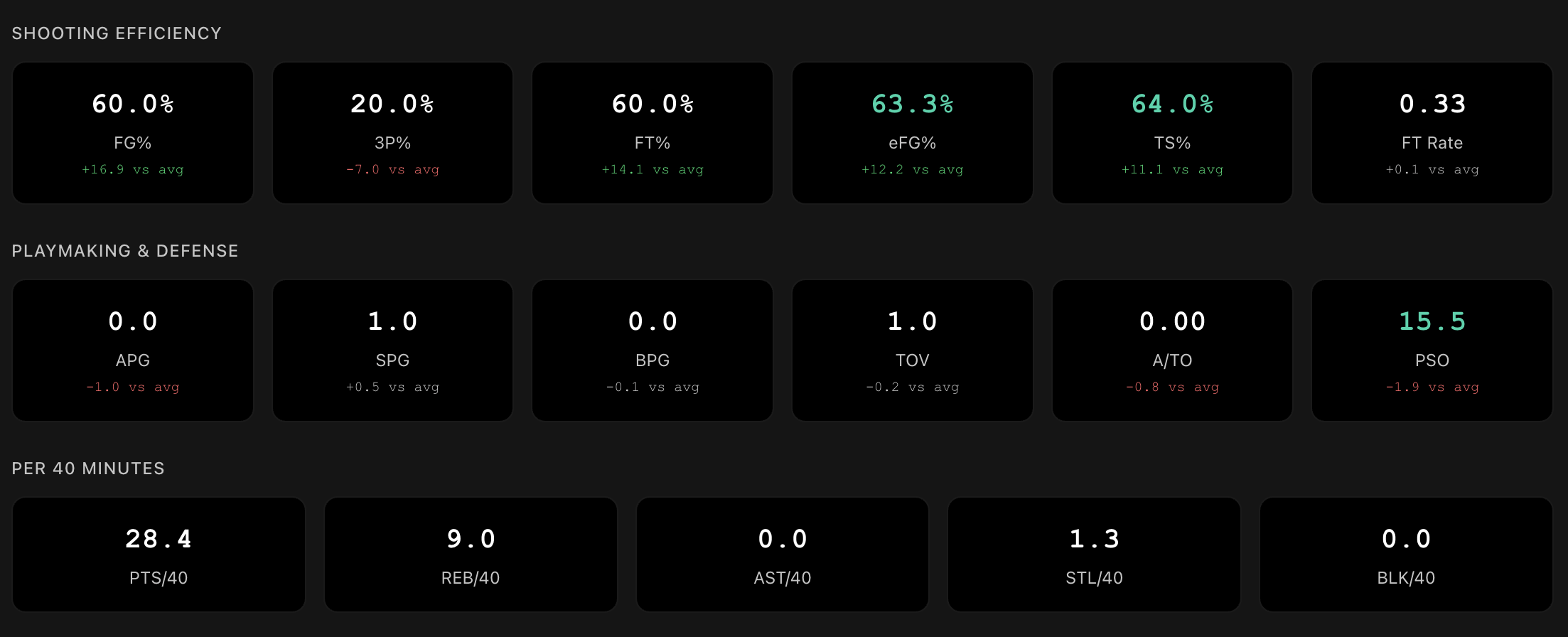
How AI basketball analysis works covers the computer vision side if you want the mechanics.
Which fits your program
A single coach running everything. Lineups, practice plans, parent comms and film all land on you, so your limiting factor is time. Choose the tool that removes work: automatic stats and highlights, fast post-game review that leads to a practice plan, and a player-facing experience so you’re not cutting individual reels.
A program with assistants and a film culture. If your staff tag consistently, a traditional platform can work. Still test whether it survives travel weeks, holidays and tournament stretches. Automation for the baseline plus staff time for deeper teaching is usually the stronger split.
Clubs, leagues and multi-team programs. Scale breaks manual workflows. One capture-and-upload process supports many games, players get a consistent experience across teams, and coaches get a repeatable review framework instead of multiplying breakdown hours.

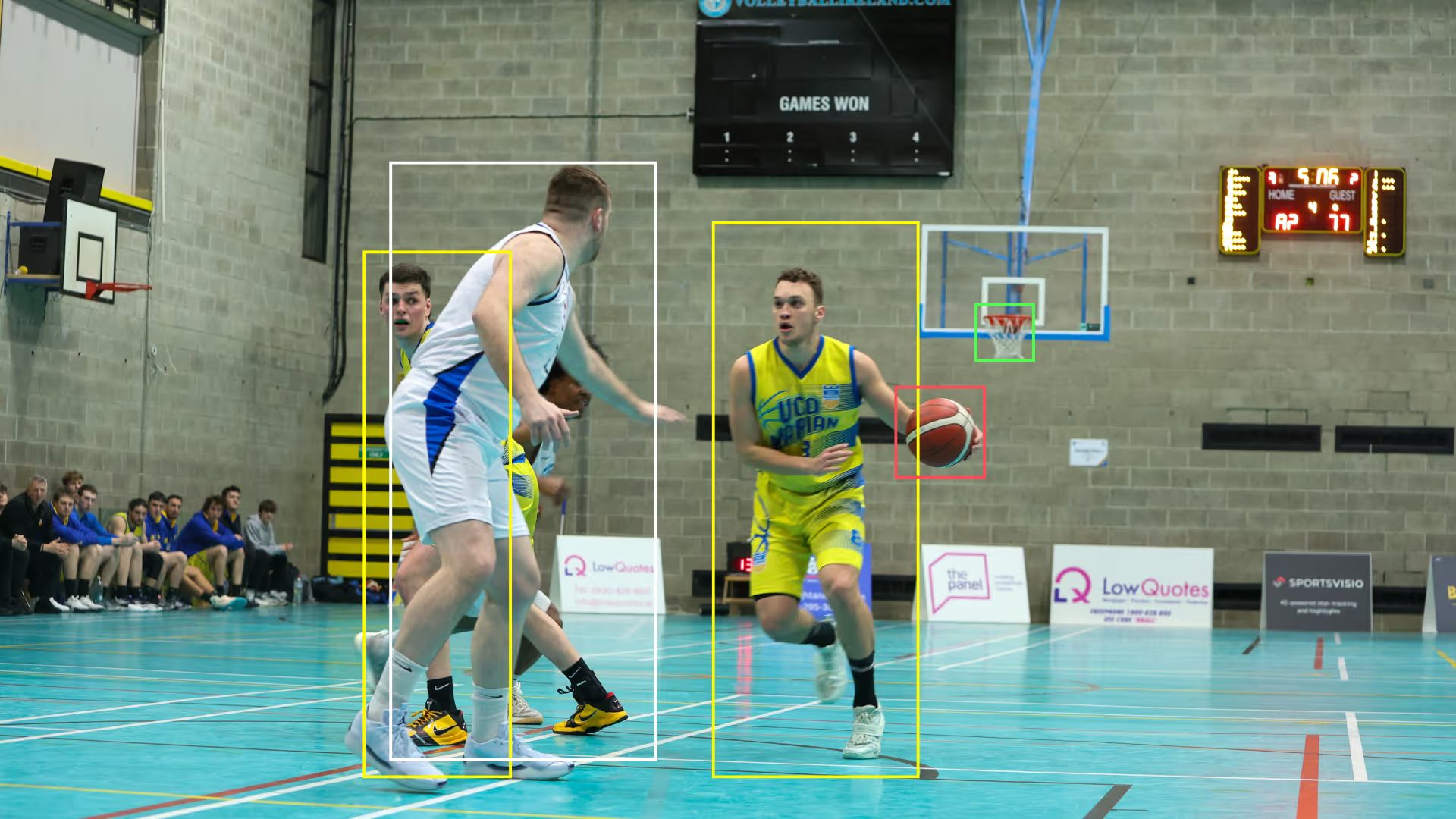
UCD Marian runs this way — worth reading alongside our other case studies.
A weekly routine that survives a real season
- Capture consistently. Stable, full-court angle, rim and key in frame. Avoid zooming and moving angles — consistency improves the automated output. Our phone-only filming guide covers doing this with nothing but a handset.
- Upload and let the first pass run. You come back to organised stats, highlights and shot charts.
- Review big to small. Team story first, then the four factors and shot charts to find the two biggest levers, then clips.
- Send players film without making more. A short set of clips each — one strength to repeat, one fix to work on. Short and consistent beats comprehensive.
- Turn film into one practice theme. Transition defence, rebounding, shot selection, ball pressure. Three clips, drill it, return to it next week.
Film review that doesn’t change practice is just watching TV.
Ask these on every demo
- What will I stop doing next week if I start using this?
- How soon after a game can I teach with the outputs?
- Can my assistants use it without me setting it up for them?
- Can players find what they need without asking me to build reels?
- Do stats and clips connect, so I can go from a number to the play instantly?
- Can I build my own playlist from a stat, or only watch what the system chose?
- Does it give me possession context, or just bigger totals?
- Does the pricing match how many games we actually play?
More practical walkthroughs live in our how-to guides.
Frequently asked questions
What is basketball analytics software?
Basketball analytics software turns game video or game events into stats, visualisations and clips that coaches and players can act on. Modern platforms use AI and computer vision to generate a box score, advanced metrics and highlight clips automatically from footage, replacing manual stat-keeping and manual film tagging.
How does AI stat tracking work?
The software identifies players, the ball and on-court actions frame by frame in your video, then logs the resulting stats automatically. No sensors, no wearables and no manual entry are required — the input is ordinary game footage.
What equipment do I need to track basketball stats with AI?
A smartphone or tablet with a camera. SportsVisio is designed around phone capture, so no fixed cameras, sensor-equipped tripods or dedicated hardware are needed to get a full box score and highlights.
How fast do AI basketball stats come back?
SportsVisio returns stats and highlights within 24 hours of upload. It is not a live, real-time system by design — the goal is reliable post-game outputs a coach can teach from before the next practice.
What are the four factors in basketball?
The four factors are shooting efficiency, turnovers, rebounding and free-throw rate — the four things Dean Oliver identified as deciding basketball games, in that order of importance. They matter to coaches because they compress a full game into the one or two areas that actually lost it. SportsVisio reports all four for every game.
What are points in the paint, and why do they matter?
Points in the paint are points scored inside the painted area near the basket, and SportsVisio tracks them for both teams in every game. They matter because two teams can score the same total in completely different ways: a paint-heavy offence and a jump-shooting offence need different defensive plans, and the split tells a coach which one they are facing.
What are points off the break?
Points off the break are points scored in transition, before the defence is set, and SportsVisio tracks them on both sides of the ball. Over a season they show whether a team’s transition game is genuinely a weapon, and defensively whether easy baskets are being conceded after misses.
What is PIE in basketball?
PIE, or Player Impact Estimate, summarises a player’s overall contribution to a game as a single percentage of the total production in that game. It is useful as a quick answer to “who actually affected this game”, including players whose value doesn’t show up in points.
Why is per-possession efficiency better than per-game totals?
Per-possession efficiency accounts for pace. A team playing 80 possessions a game will out-total a team playing 60 without being better, so totals flatter fast teams and punish slow ones. Efficiency compares them fairly.
Can I build my own clips and playlists?
Yes. Alongside automatically generated highlights, SportsVisio lets you create and share your own playlists — for example every point off the break, or every defensive rebound — so film review matches your practice plan rather than the system’s defaults.
Is basketball analytics software worth it for youth and club teams?
Yes, and arguably more than for elite programs, because youth and club coaches rarely have staff to break down film. Automation replaces the assistant coach they don’t have, and per-game or per-season pricing means the cost matches how much they actually play.
Can I share highlights with college coaches and recruiters?
Yes — highlights can go straight to social platforms or be sent as a link, which is how most recruiting film is shared now.
How much does SportsVisio cost?
Pricing depends on sport and how many games you run. See current pricing.
The short version
The right platform gives you your week back and still hands your players better information than they’ve ever had. Judge every option on the work it removes and the context it adds, not the features it lists. See what SportsVisio costs for your number of games.
Related Stories
Book a Demo and Get a Free Trial
Set up time to speak with our team and see our product in action.